
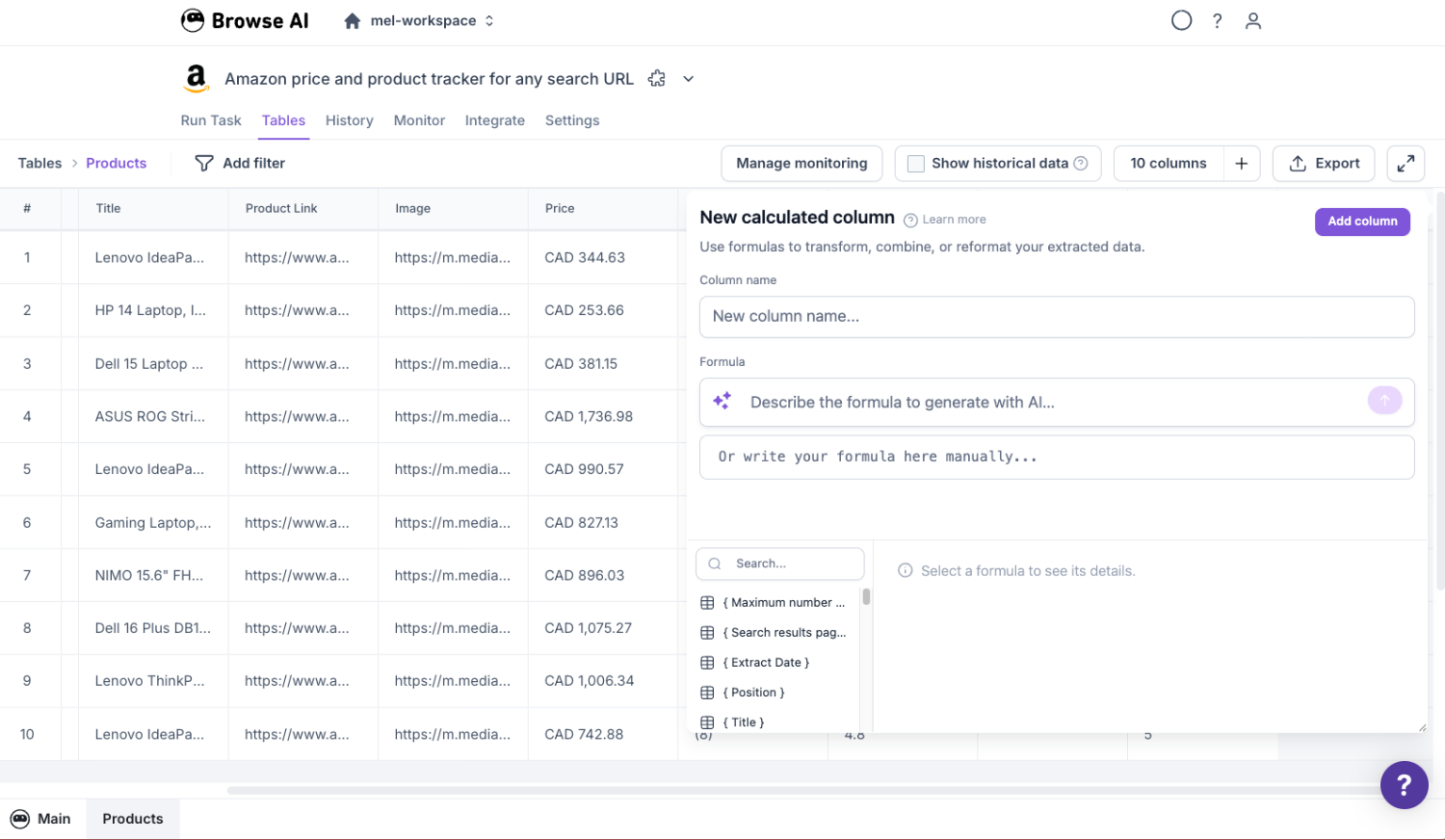
A built-in data transformation tool that lets you clean data, calculate, categorize, and extract insights from your data. Describe what you need in plain language and Formula AI writes the formula for you.

Type what you want in plain language. Formula AI understands your table columns and row data, generates the formula, and shows you a live preview of the results before you save. Refine with follow-up messages. No syntax to learn.
Create calculated columns that clean, combine, categorize, or calculate new values from your extracted data. Formulas run on every row, including all future extractions. Your data transformation logic is always up to date.
Run bulk tasks across your data, chain robots together with workflows, and use calculated columns as input parameters for downstream automations. Build complete data pipelines without writing code.
Scraped prices come with currency symbols, commas, and formatting that breaks analysis. Tables automatically strips text, converts to numbers, and standardizes formats across every extraction.
Label products as budget, mid-range, or premium. Flag leads as hot, warm, or cold. Create stock status indicators. Build any categorization logic by describing your rules in plain language.
Turn raw price data into business intelligence. Calculate profit margins, discount percentages, price-per-unit, and other derived metrics directly in your table.
Pull structured data out of messy text fields. Extract email addresses from contact blocks, domain names from URLs, or first names from full name fields.
Automatically flag rows that are missing critical fields. Identify incomplete records before they flow into your CRM, spreadsheet, or downstream tools.
Navigate to any robot and switch to the Tables view to see your extracted data in a structured table format.
Click the add calculated column button in the top-right corner of your table to open the formula editor with Formula AI.
Type a description of the transformation you need. Formula AI understands your columns and data, then generates the formula automatically.
See formula results evaluated against your real row data in real time. Refine with follow-up messages if needed.
Click Save and your calculated column applies to all existing rows and every future extraction automatically. No maintenance required.
Describe your formula in plain language. The AI generates it, you preview it, done. Supports follow-up refinements with full conversation context.
See formula results evaluated against your actual row data in real time. Verify before you save.
Full library of text, math, logic, and regex functions. Compatible with familiar spreadsheet syntax.
Add new columns that transform data automatically on every extraction. Clean, combine, categorize, calculate.
Run operations across your entire dataset. Process hundreds or thousands of rows at once.
Use calculated columns as input parameters in workflows. Chain robots together for end-to-end automation.
Your cleaned, categorized, and enriched data syncs automatically to Google Sheets, Airtable, and 7,000+ apps via Zapier. No extra export steps. The data that arrives in your tools is already transformed.


Browse AI Premium gives you a dedicated team to set up, maintain, and scale your data pipelines. We handle the robots, the transformations, and the delivery so your team can focus on using the data.
Talk to salesFormula AI is an AI-powered assistant built into Browse AI's calculated column editor. You describe what you want in plain language, and it generates the formula for you. It understands your table columns and row data, and you can preview results before saving.
No. Formula AI lets you create formulas by describing what you need in plain English. You can also write formulas manually if you prefer.
You can clean and standardize text, convert data types, calculate new values (margins, percentages, scores), categorize and segment rows, extract patterns from text (emails, domains, phone numbers), validate data completeness, and more.
Yes. Once you create a calculated column, it applies to all existing rows and every future extraction automatically.
Yes. Calculated columns can be used as input parameters in workflows, so you can chain robots together and pass transformed data between them.
Yes. All calculated columns are included when your data syncs to Google Sheets, Airtable, or any integration via Zapier.
Browse AI supports 50+ functions including text manipulation (SUBSTITUTE, CONCATENATE, TRIM, REGEXEXTRACT), math (ROUND, VALUE, ABS), logic (IF, AND, OR, NOT), and error handling (IFERROR, ISBLANK). See our full reference guide in the help center.
There is no hard limit. You can create as many calculated columns as you need, and they can reference each other.
